> ## Documentation Index
> Fetch the complete documentation index at: https://benrover-docs.tekbot.io/llms.txt
> Use this file to discover all available pages before exploring further.
# BenRover Dashboard
> A sophisticated graphical user interface for monitoring our Mars rover
## 🌟 Overview
The BenRover Dashboard is a sophisticated graphical user interface designed to monitor our Mars rover. This dashboard provides real-time data visualization and system status updates, leveraging Firebase for data storage and retrieval.
## 🎥 Demo
Here's a quick demonstration of the BenRover Dashboard interface:
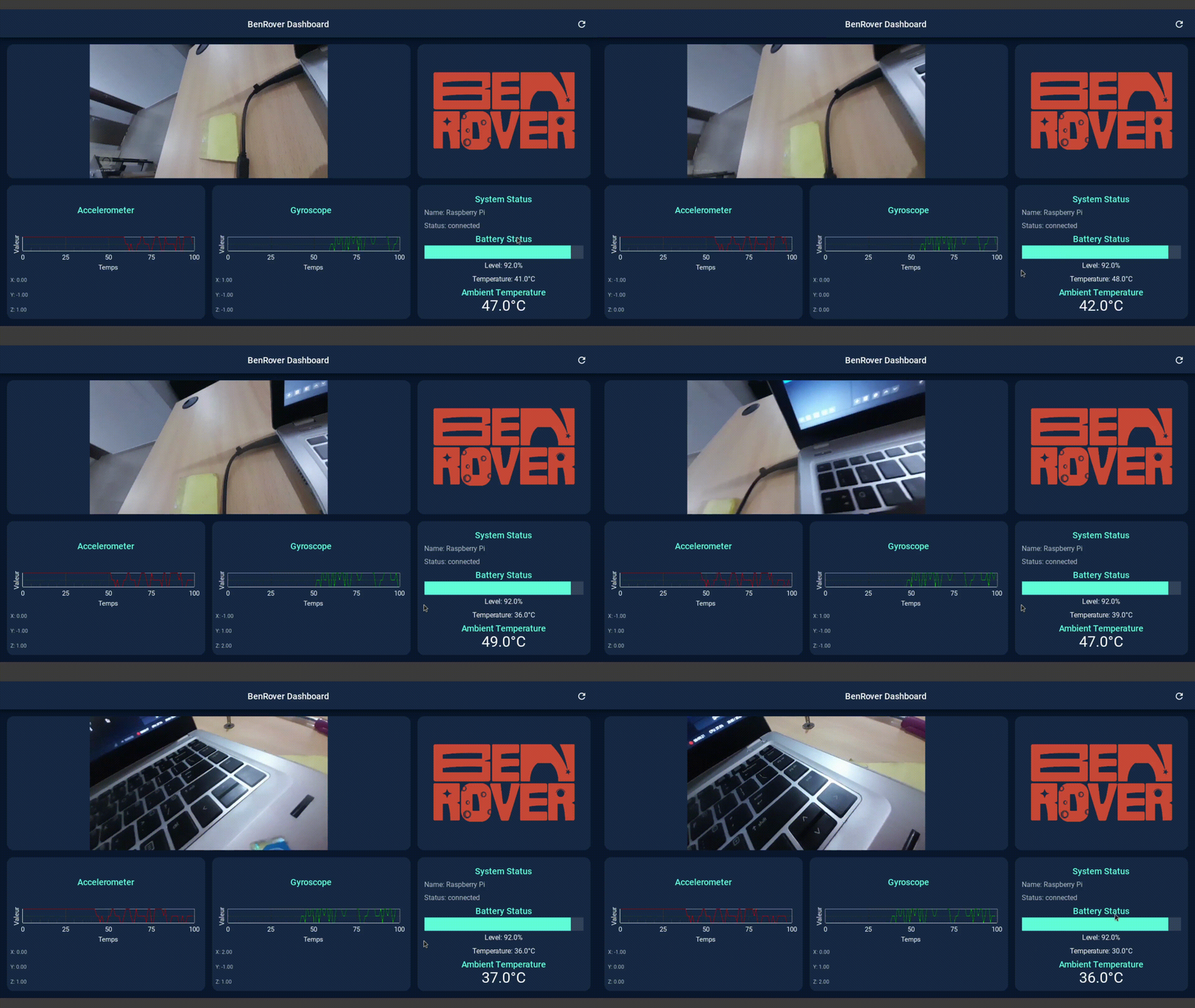 This GIF showcases the main features of the BenRover Dashboard, including:
* Real-time sensor data display (accelerometer and gyroscope)
* Live video feed from the rover's camera
* System status updates and battery monitoring
* Interactive graphs for data visualization
## 🛠️ Features
Showcases live data from the rover's sensors
Displays a live video feed from the rover's camera
Provides up-to-date information on the rover's operational status
Shows the current battery level and temperature
Displays the surrounding temperature as detected by the rover
Visualizes accelerometer and gyroscope data in real-time
Utilizes KivyMD for a modern, responsive user interface
## 📋 Prerequisites
* Python 3.7+
* Kivy
* KivyMD
* Firebase Admin SDK
* OpenCV
* Other dependencies listed in `requirements.txt`
## 💻 Installation
1. Clone the repository:
```bash theme={null}
git clone https://github.com/BenRover-24/rosws.git
cd Rover_dashboard
```
2. Create a virtual environment (optional but recommended):
```bash theme={null}
python -m venv venv
source venv/bin/activate # On Windows use `venv\Scripts\activate`
```
3. Install the required dependencies:
```bash theme={null}
pip install -r requirements.txt
```
4. Set up Firebase:
* Create a Firebase project and obtain the `credentials.json` file.
* Place the `credentials.json` file in the project root directory.
## 🚀 Usage
To run the BenRover Dashboard:
```bash theme={null}
python benrover_dashboard.py
```
## ⚙️ Configuration
* Modify the `credentials.json` file with your Firebase project credentials.
* Adjust the video feed URL in the `update_video` method of the `RoverDashboard` class to match your rover's camera stream address.
## 📁 File Structure
```
benrover-dashboard/
├── benrover_dashboard.py
├── credentials.json
├── requirements.txt
└── img/
├── logo.png
└── placeholder.png
```
* `benrover_dashboard.py`: Main application file containing the dashboard logic and UI.
* `credentials.json`: Firebase credentials file (keep this secure and do not share publicly).
* `requirements.txt`: List of Python dependencies.
* `img/`: Directory containing images used in the dashboard.
## 🤝 Contributing
Contributions to the BenRover Dashboard project are welcome. Please follow these steps:
1. 🍴 Fork the repository.
2. 🌿 Create a new branch for your feature.
3. ✏️ Commit your changes.
4. 🚀 Push to the branch.
5. 🔍 Create a new Pull Request.
## 🙏 Acknowledgements
* Thanks to the Kivy and KivyMD communities for their excellent UI frameworks.
* Gratitude to the Firebase team for their real-time database solution.
* Special thanks to all contributors and testers of the BenRover project.
***
🌟 Developed with passion by the BenRover Team 🇧🇯
This GIF showcases the main features of the BenRover Dashboard, including:
* Real-time sensor data display (accelerometer and gyroscope)
* Live video feed from the rover's camera
* System status updates and battery monitoring
* Interactive graphs for data visualization
## 🛠️ Features
Showcases live data from the rover's sensors
Displays a live video feed from the rover's camera
Provides up-to-date information on the rover's operational status
Shows the current battery level and temperature
Displays the surrounding temperature as detected by the rover
Visualizes accelerometer and gyroscope data in real-time
Utilizes KivyMD for a modern, responsive user interface
## 📋 Prerequisites
* Python 3.7+
* Kivy
* KivyMD
* Firebase Admin SDK
* OpenCV
* Other dependencies listed in `requirements.txt`
## 💻 Installation
1. Clone the repository:
```bash theme={null}
git clone https://github.com/BenRover-24/rosws.git
cd Rover_dashboard
```
2. Create a virtual environment (optional but recommended):
```bash theme={null}
python -m venv venv
source venv/bin/activate # On Windows use `venv\Scripts\activate`
```
3. Install the required dependencies:
```bash theme={null}
pip install -r requirements.txt
```
4. Set up Firebase:
* Create a Firebase project and obtain the `credentials.json` file.
* Place the `credentials.json` file in the project root directory.
## 🚀 Usage
To run the BenRover Dashboard:
```bash theme={null}
python benrover_dashboard.py
```
## ⚙️ Configuration
* Modify the `credentials.json` file with your Firebase project credentials.
* Adjust the video feed URL in the `update_video` method of the `RoverDashboard` class to match your rover's camera stream address.
## 📁 File Structure
```
benrover-dashboard/
├── benrover_dashboard.py
├── credentials.json
├── requirements.txt
└── img/
├── logo.png
└── placeholder.png
```
* `benrover_dashboard.py`: Main application file containing the dashboard logic and UI.
* `credentials.json`: Firebase credentials file (keep this secure and do not share publicly).
* `requirements.txt`: List of Python dependencies.
* `img/`: Directory containing images used in the dashboard.
## 🤝 Contributing
Contributions to the BenRover Dashboard project are welcome. Please follow these steps:
1. 🍴 Fork the repository.
2. 🌿 Create a new branch for your feature.
3. ✏️ Commit your changes.
4. 🚀 Push to the branch.
5. 🔍 Create a new Pull Request.
## 🙏 Acknowledgements
* Thanks to the Kivy and KivyMD communities for their excellent UI frameworks.
* Gratitude to the Firebase team for their real-time database solution.
* Special thanks to all contributors and testers of the BenRover project.
***
🌟 Developed with passion by the BenRover Team 🇧🇯