
🌟 Overview
The BenRover Dashboard is a sophisticated graphical user interface designed to monitor our Mars rover. This dashboard provides real-time data visualization and system status updates, leveraging Firebase for data storage and retrieval.🎥 Demo
Here’s a quick demonstration of the BenRover Dashboard interface: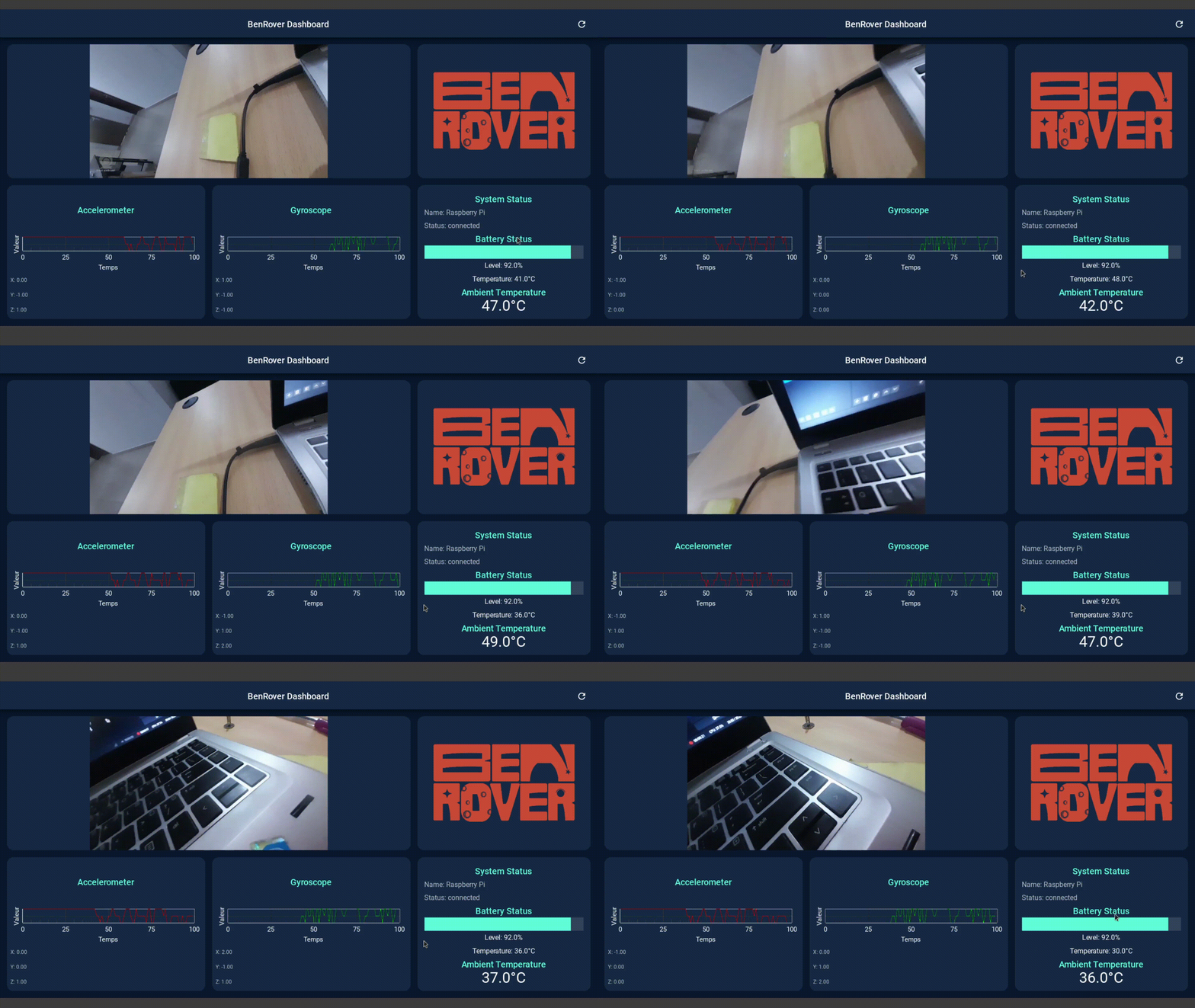
This GIF showcases the main features of the BenRover Dashboard, including:
- Real-time sensor data display (accelerometer and gyroscope)
- Live video feed from the rover’s camera
- System status updates and battery monitoring
- Interactive graphs for data visualization
🛠️ Features
📊 Real-time Data Display
Showcases live data from the rover’s sensors
📹 Video Feed
Displays a live video feed from the rover’s camera
🚦 System Status
Provides up-to-date information on the rover’s operational status
🔋 Battery Monitoring
Shows the current battery level and temperature
🌡️ Ambient Temperature
Displays the surrounding temperature as detected by the rover
📈 Interactive Graphs
Visualizes accelerometer and gyroscope data in real-time
📱 Responsive Design
Utilizes KivyMD for a modern, responsive user interface
📋 Prerequisites
- Python 3.7+
- Kivy
- KivyMD
- Firebase Admin SDK
- OpenCV
- Other dependencies listed in
requirements.txt
💻 Installation
- Clone the repository:
- Create a virtual environment (optional but recommended):
- Install the required dependencies:
- Set up Firebase:
- Create a Firebase project and obtain the
credentials.jsonfile. - Place the
credentials.jsonfile in the project root directory.
- Create a Firebase project and obtain the
🚀 Usage
To run the BenRover Dashboard:⚙️ Configuration
- Modify the
credentials.jsonfile with your Firebase project credentials. - Adjust the video feed URL in the
update_videomethod of theRoverDashboardclass to match your rover’s camera stream address.
📁 File Structure
benrover_dashboard.py: Main application file containing the dashboard logic and UI.credentials.json: Firebase credentials file (keep this secure and do not share publicly).requirements.txt: List of Python dependencies.img/: Directory containing images used in the dashboard.
🤝 Contributing
Contributions to the BenRover Dashboard project are welcome. Please follow these steps:- 🍴 Fork the repository.
- 🌿 Create a new branch for your feature.
- ✏️ Commit your changes.
- 🚀 Push to the branch.
- 🔍 Create a new Pull Request.
🙏 Acknowledgements
- Thanks to the Kivy and KivyMD communities for their excellent UI frameworks.
- Gratitude to the Firebase team for their real-time database solution.
- Special thanks to all contributors and testers of the BenRover project.
🌟 Developed with passion by the BenRover Team 🇧🇯